
Information for Presenters
Poster Presentations
1. Poster mounting and removal
1) Poster mounting time
Please mount your poster during the following times after completing the congress check-in process.
Please bring your own poster and display it yourself.
* Lead presenters of poster presentations are required to register for the “Early Registration” category. Please complete your payment (including receipt by us) by noon on Friday, September 11.
If the presenter is from other fields, please pay the participation fee (16,000 yen) when registering on the day of the congress.
Poster mounting time
| Date | Mounting date and time | Where to submit |
|---|---|---|
| November 20 (Fri.) Presentation Number P●-1-● | November 20 (Fri.) 9:30–12:00 | Wave Market 1F, Toki Messe |
| November 21 (Sat.) Presentation Number P●-2-● | November 21 (Sat.) 9:00–12:00 |
* To ensure the smooth running of the congress, we ask for your cooperation in completing your poster display within the designated time.
2) Poster removal time
Please remove your poster during the following times
* Please note that any posters that remain up after the designated removal time will be removed and disposed of by the congress organizer.
Poster removal time
| Date | Removal date and time |
|---|---|
| November 20 (Fri.) Presentation Number P●-1-● | November 20 (Fri.) 17:30–18:30 |
| November 21 (Sat.) Presentation Number P●-2-● | November 21 (Sat.) 17:30–18:30 |
3) Supplies prepared by the congress organizer
- Display panel: A panel will be prepared for each presentation.
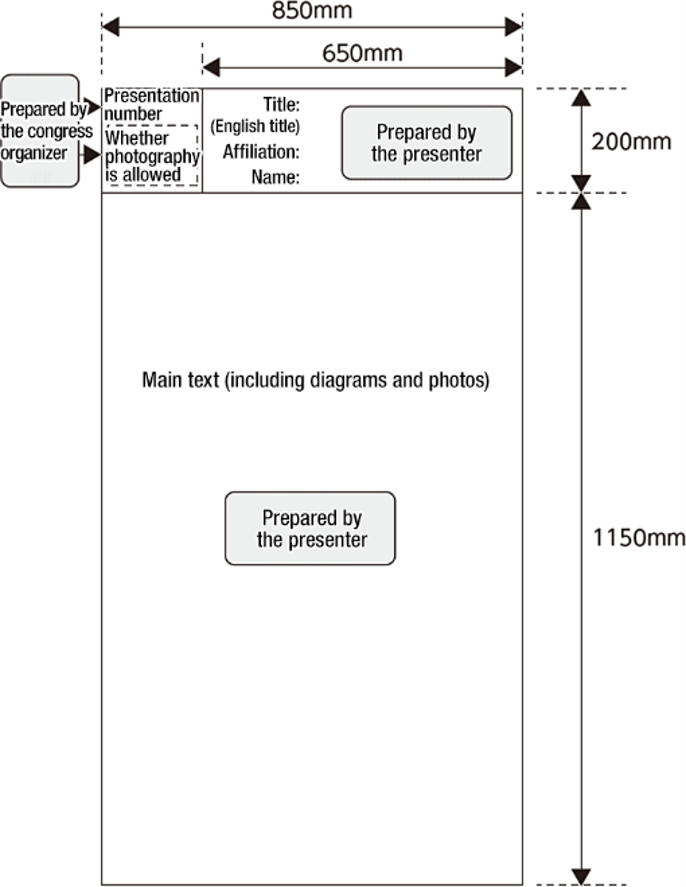
- Presentation number: The presentation number will be attached and displayed in the upper left corner of the display panel.
- Pushpins: Pushpins will be provided for attaching the poster.
- A sticker indicating whether photography is allowed: A sticker indicating whether photography is allowed will be prepared for each poster board.
- Please paste it below the presentation number.
2. How to give a poster presentation
- After completing the check-in process, please display the poster you have brought with you to the poster presentation venue during the time stated above.
- Presenters must complete their poster display within the time stated above and be ready in front of their poster 10 minutes before the start of the designated time.
- There will be no chairperson or presentation time set. Please wait in front of your poster at the designated time and be available for discussions and questions.
| Date | Presentation number | Waiting time |
|---|---|---|
| November 20 (Fri.) Day 1 |
Presentation number P●-1-● (ends with an odd number) | November 20 (Fri.) 12:30–13:30 |
| Presentation number P●-1-● (ends with an even number) | November 20 (Fri.) 16:30–17:30 | |
| November 21 (Sat.) Day 2 |
Presentation number P●-2-● (ends with an odd number) | November 21 (Sat.) 12:30–13:30 |
| Presentation number P●-2-● (ends with an even number) | November 21 (Sat.) 16:30–17:30 |
3. Presentation format and preparation method
Before the congress (for on-demand distribution)
What to submit
PDF (1 template: format available)
* For instructions on how to convert PowerPoint to PDF, please refer to “Procedure for Creating Poster Data.”
How to submit
Please submit your PDF data via the URL provided in the email (scheduled for early August) sent by the Presentation Secretariat to presenters who have completed early registration.
Submission deadline
Friday, September 25 at noon
Creation guidelines
- You can register one file per presentation. The maximum capacity is 5 MB.
-
Please use standard fonts for your OS.
[Japanese]
MS Gothic, MSP Gothic, MS Mincho, MSP Mincho, Meiryo, Yu Gothic, Yu Mincho, UD
[English]
Times New Roman, Arial, Arial Black, Arial Narrow, Century, Century Gothic, Courier, Courier New, Georgia
* Please note that when using the Osaka font on a Mac, characters may be misaligned or garbled. -
Please refer to the following URL for the procedure for creating a poster and for a poster template.
https://www2.mas-sys.com/jotc60/presenters-e.html
5) Declaration of conflicts of interest (COI)
On the day
What to submit (bring)
Poster for display on-site
(including diagrams and photos, 1,350 mm height, 850 mm width)
* Content of the poster to be displayed on-site:Presentation content (including diagrams and photos, 1,150 mm height, 850 mm width) / Presentation title, affiliation, and name (200 mm height, 650 mm width)
Poster form
Please refer to the image on the right for the poster form and fill in the title, English title, affiliation, name, and main text. Although there are no specific regulations regarding text size, font type, or the number of diagrams, photos, and other images, please be sure to create your poster within the specified size.
* For posters, it does not matter whether you create a single poster or multiple posters as long as they fit within the specified dimensions.
Notes
* Registered content (abstract) cannot be modified or deleted after the abstract submission period. Similarly, PDF data cannot be modified or deleted after the submission deadline. If there are any changes in your affiliation or name (surname), you may simply indicate your updated affiliation and name (surname) on the slides used for your presentation.
